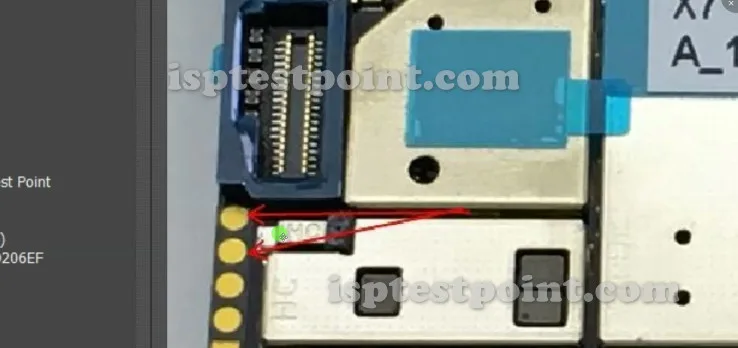
Vivo X7 Plus Test Points — Essential Hardware Diagnostic Locations and Their Functions
Test points on the Vivo X7 Plus mainboard provide direct access to critical signal lines for advanced troubleshooting and firmware operations. These dedicated pads bypass normal software interfaces and allow technicians to communicate directly with the eMMC storage, power rail circuits, and boot sequences. Proper identification and safe contact with test points is essential for FRP removal, firmware recovery, and dead-boot device restoration.
The primary test points include eMMC ISP lines (CLK, CMD, DAT0–DAT3, VCC, GND, VCCQ), USB data signals, and power rail monitoring pads. Each point serves a specific diagnostic function and requires precise multimeter readings during normal operation to establish baseline values for comparison during troubleshooting.

When to Use Test Points — Typical Troubleshooting Scenarios Requiring Hardware-Level Access
Test points are accessed when software-based methods are unavailable or ineffective. Common scenarios include:
- FRP Lock Removal: Direct eMMC access to erase or modify FRP partitions without Google account verification.
- Dead-Boot Repair: When the device fails to enter recovery or fastboot mode due to corrupted bootloader or firmware.
- Firmware Flashing: Emergency firmware restoration using external programmers (UMT, EasyJTAG) connected to test pads.
- Charging Issues: Power rail diagnostics when USB charging detection fails.
- No Display / Hard Brick: Verification of VCCQ, VCC, and ground continuity when device shows no signs of life.
Locating Test Points — Step-by-Step Navigation to Key Test Pads and Connectors
The Vivo X7 Plus mainboard layout places eMMC test points in proximity to the primary storage chip, typically located near the CPU area. The exact coordinates and pad designations vary based on PCB revision. Consult the device's schematic or reference images specific to your unit's board version. Use a magnifying glass and fine-tip probe to contact pads without bridging adjacent traces. Establish contact with minimal pressure to avoid pad lifting or solder bridge formation.
Multimeter Measurement Reference — Voltage and Resistance Values for Normal Operation
When the device is powered off but connected to a USB power source:
- VCC (3.3V rail): 3.1–3.5 V DC
- VCCQ (1.8V rail): 1.7–1.9 V DC
- GND: 0 V (reference)
- CLK, CMD, DAT0–DAT3: Floating (no fixed voltage; varies during operation)
Resistance measurements: Each signal line should show high impedance (>1 MΩ) when measured to ground on a powered-off device.
Safety Precautions — Critical Warnings Before Working with Live Circuits
Never probe test points with live USB power connected without proper grounding and isolation. Always discharge static electricity using an ESD wrist strap connected to a grounded point on the mainboard. Use precision probes and tweezers to avoid accidental bridging that may cause permanent damage or fire hazard. Do not attempt test-point work if you lack professional training; incorrect contact may brick the device irreversibly.
Pin / Test Point Reference
| Pin | Description |
|---|---|
| VCC | 3.3V primary power rail — Should measure 3.1–3.5 V when USB powered |
| VCCQ | 1.8V eMMC I/O power rail — Should measure 1.7–1.9 V when USB powered |
| GND | Ground reference — 0 V reference point |
| CLK | eMMC clock signal — Floating when powered off |
| CMD | eMMC command line — Floating when powered off |
| DAT0 | eMMC data line 0 — Floating when powered off |
Tools required: UMT (Universal Multi-Tool), EasyJTAG Plus, Digital Multimeter, Precision Probes, ESD Wrist Strap, Magnifying Glass, USB Power Supply
Supported operations: FRP Erase, Firmware Read, Firmware Flash, Dead Boot Repair, eMMC Direct Access, Power Rail Diagnostics
⚠ Safety note: Do not probe test points with live power unless properly grounded. Risk of electrostatic discharge, short circuits, and permanent device damage. Use precision tools only. No guarantee of success; improper technique may brick the device.

Comments (0)
Be the first to comment.