Description
The Realme C25 is built around the MediaTek Helio G70 chipset with eMMC flash storage and a large 6000mAh battery. ISP pinout access is the standard hardware-level recovery method when the phone's software has failed beyond what normal tools can fix. The large battery size means extra care is needed during disassembly, since a punctured lithium cell near active soldering creates a genuine fire risk.

Download Realme C25 ISP Pinout
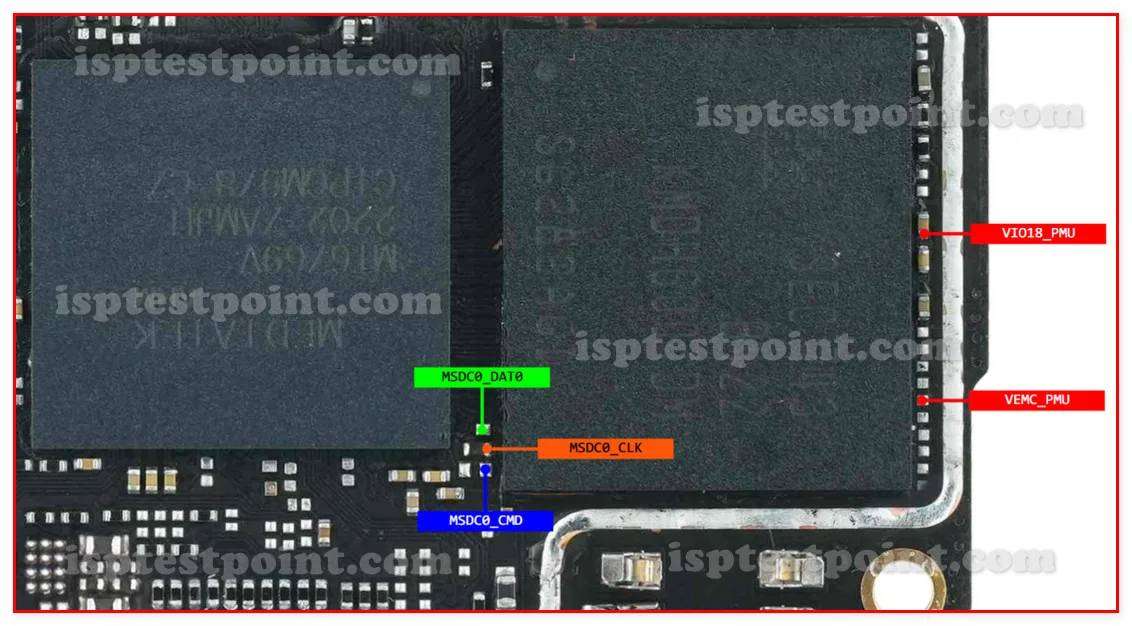
The ISP pinout diagram marks CLK, CMD, DATA0, VCC (3.3V max), VCCQ (1.8V max), and GND on the eMMC chip. The pads are small, unlabeled, and grouped tightly. Download the diagram and study it at full zoom — the tight spacing means confusing CMD with DATA0 is easy without a reference, and swapping them can cause a failed or corrupted session.
How To Reset And Flash With ISP Pinout
After connecting ISP wires, power through the programmer only — battery must be disconnected and stored in a fire-safe container away from the work area. Select Helio G70 / eMMC in your tool. Erase FRP partition for lock removal, or write a full stock ROM for dead boot recovery. Let the process complete without interruption. After flashing, disconnect ISP wires, reconnect battery, and boot.
How To Find ISP Pinout Realme C25
Remove the back cover carefully and disconnect the battery — store it in a fireproof pouch or metal tray, not on the workbench. Remove the motherboard and flip it. Locate the eMMC chip near the center. Under magnification, trace the ISP pads using the diagram. Confirm each pad with a multimeter before soldering. Verify ground continuity is solid before applying any power.
Final Words
The Realme C25's ISP pinout repair is straightforward once the board is accessible, but the large 6000mAh battery demands extra safety attention during disassembly and storage. Follow standard voltage limits and ESD precautions. Always inform the customer that data loss is part of the process.

Comments (0)
Be the first to comment.