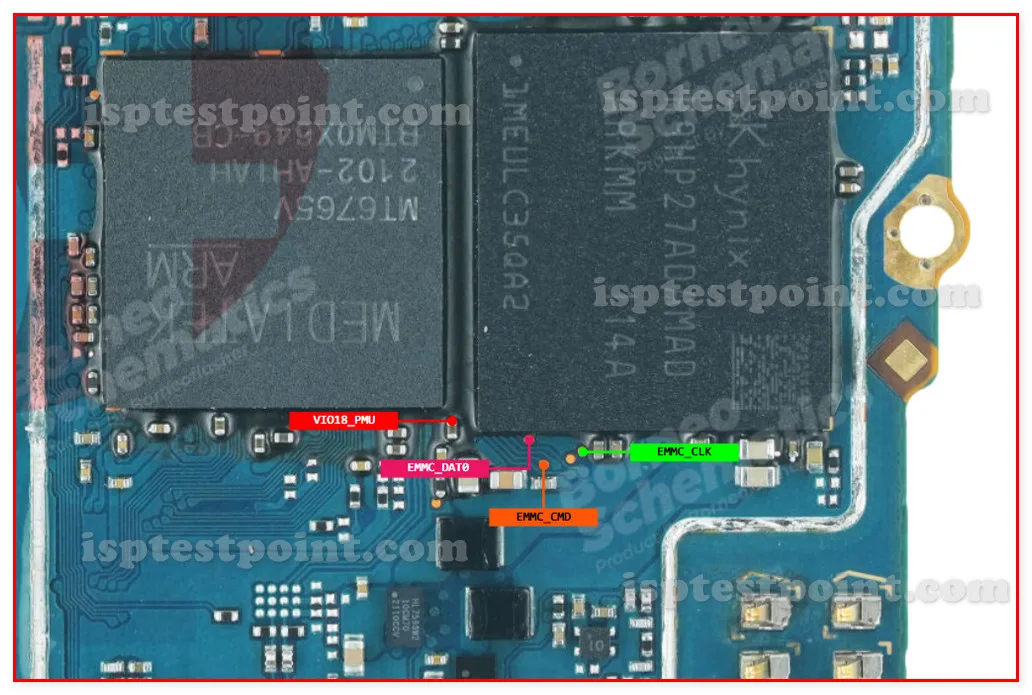
Description
The Realme C21 uses a Unisoc (formerly Spreadtrum) T610 chipset with eMMC storage — a less common platform in ISP repair guides compared to Qualcomm or MediaTek. This makes a verified pinout diagram especially valuable, since fewer community resources exist for Unisoc boards. ISP access is needed for the same scenarios as any other phone: dead boot, bootloop, FRP lock with no recovery path.

Download Realme C21 ISP Pinout
The ISP pinout diagram shows CLK, CMD, DATA0, VCC (3.3V max), VCCQ (1.8V max), and GND on the eMMC chip. Because Unisoc layouts are less widely documented than Qualcomm or MediaTek, this diagram is especially important — guessing pad positions on a Unisoc board is riskier than usual. Download and verify against your board carefully.
How To Reset And Flash With ISP Pinout
Connect ISP wires, power through programmer, and confirm your tool has a Unisoc T610 / eMMC profile available. Not all ISP tools supported Unisoc from day one — check for firmware updates if the chipset doesn't appear. Once detected, erase FRP partition for lock removal or write full firmware for dead boot recovery. After flashing, disconnect wires, reconnect battery, and boot.
How To Find ISP Pinout Realme C21
Disassemble the device, disconnect battery, remove and flip the motherboard. Locate the eMMC chip near the center. The Unisoc T610 board has a different component layout compared to MediaTek or Qualcomm boards, so rely strictly on the downloaded diagram rather than positional memory from other repairs. Trace all six pads under magnification and confirm with a multimeter.
Final Words
The Realme C21's Unisoc T610 platform is less commonly documented but follows the same ISP repair principles as any eMMC-based phone. Having a verified pinout diagram and confirmed tool support are the keys to a successful session. Standard voltage limits and ESD protection apply. Inform the customer about data loss.

Comments (0)
Be the first to comment.