Description
The Realme C15 shares its Helio G35 platform with the C11, and the ISP pinout layout is broadly similar between the two. ISP access is needed when the phone won't boot, is stuck in a restart loop, or is locked behind FRP after a factory reset. Direct eMMC access through the ISP pads gives the technician full control over the flash memory, bypassing all software layers.

Download Realme C15 ISP Pinout
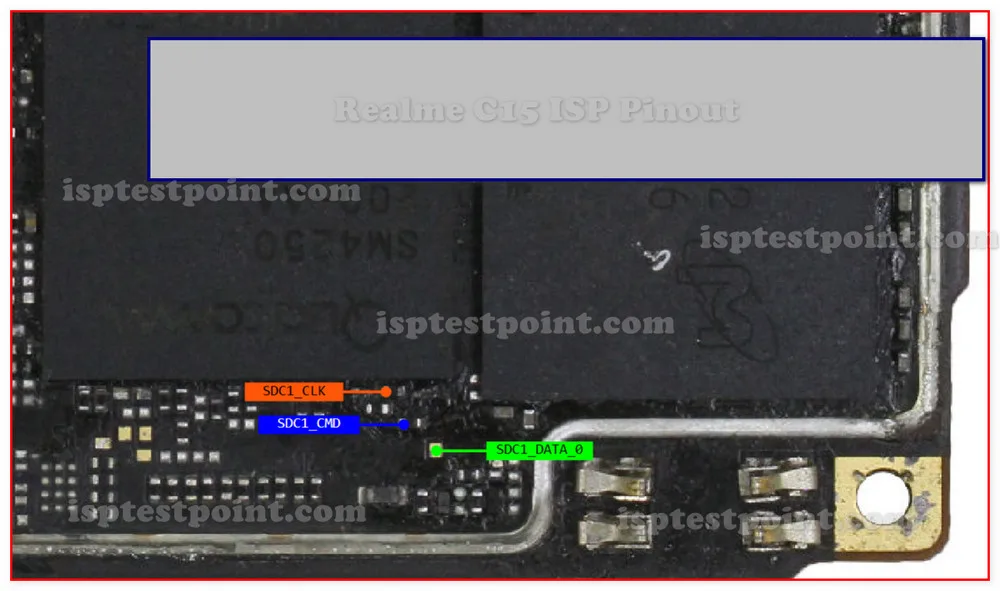
The ISP pinout diagram maps CLK, CMD, DATA0, VCC (3.3V max), VCCQ (1.8V max), and GND around the eMMC chip. While the layout is close to the C11's, always use the C15-specific diagram rather than assuming they are identical — minor PCB differences can shift pad positions. Download and compare carefully.
How To Reset And Flash With ISP Pinout
After connecting ISP wires, power through the programmer only. Select Helio G35 / eMMC profile. Erase FRP partition for lock removal, or write full firmware for dead boot. The C15's larger 6000mAh battery should be removed and stored safely during the repair. After flashing, disconnect wires, reconnect battery, and boot.
How To Find ISP Pinout Realme C15
Remove the back cover, disconnect the battery and store it safely, then remove the motherboard. Flip the board and find the eMMC chip near the center. Under magnification, trace the ISP pads using the downloaded diagram. Secure the phone in a fixture during soldering — the compact internal layout leaves limited working room. Confirm all pads with a multimeter.
Final Words
The Realme C15's ISP pinout is a reliable repair tool for dead boot, FRP lock, and firmware corruption. The larger battery requires extra safety attention during disassembly. Follow standard voltage and ESD precautions, and set expectations with the customer about data loss.

Comments (0)
Be the first to comment.