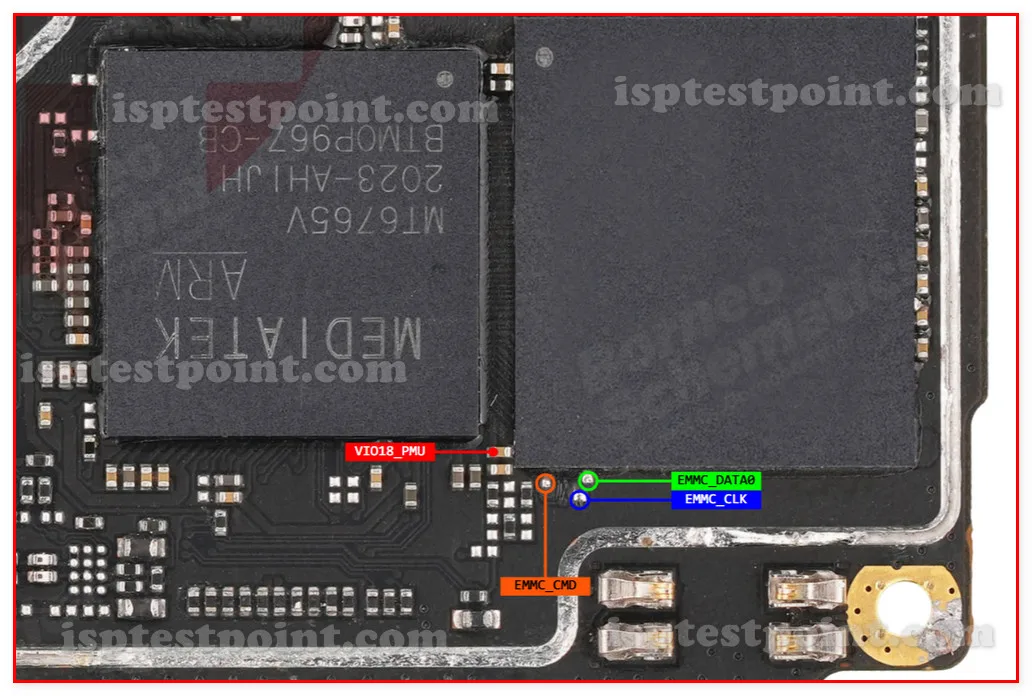
Description
The Realme C11 is an entry-level device running the MediaTek Helio G35 chipset with eMMC storage. Despite its budget positioning, ISP pinout access works identically to higher-end devices — it provides direct hardware access to the eMMC chip when the phone's software layer has failed completely. Common repair scenarios include dead boot, bootloop, and FRP lock with no Google account recovery available.

Download Realme C11 ISP Pinout
The ISP pinout diagram shows CLK, CMD, DATA0, VCC (3.3V max), VCCQ (1.8V max), and GND on the eMMC chip. Budget boards like the C11 sometimes have tighter pad spacing than flagship models, making the diagram even more important for accurate identification. Download the image and compare at full magnification.
How To Reset And Flash With ISP Pinout
Connect ISP wires, power through programmer, select Helio G35 / eMMC profile. Erase FRP partition for lock removal, or write full firmware for dead boot recovery. Budget boards sometimes use thinner PCB traces that can be damaged by excessive heat — take this into account during connection. After flashing, disconnect wires, reconnect battery, and boot.
How To Find ISP Pinout Realme C11
Disassemble the device, disconnect battery, remove and flip the motherboard. Locate the eMMC chip near the center. The C11's PCB traces are thinner than on more expensive devices, so apply controlled brief heat when soldering. Trace pads under magnification using the diagram. Confirm all connections with a multimeter.
Final Words
The Realme C11's ISP pinout is reliable despite the device's budget construction. Careful soldering technique matters more on this board. Follow voltage limits, use ESD protection, and discuss repair cost versus device value with the customer, since ISP work takes real time and should be priced fairly.

Comments (0)
Be the first to comment.