Description
The Realme 5i shares the Qualcomm Snapdragon 665 platform with other members of the Realme 5 family, but its PCB layout has minor differences that affect where the ISP test pads are positioned. ISP pinout access is the standard fallback when this phone refuses to boot, gets stuck in an infinite restart cycle, or is locked behind FRP after a factory reset with no account credentials available.
By connecting directly to the eMMC chip's data and power pads, a technician can read the existing firmware, write a new one, or selectively erase partitions like FRP — all without needing the phone's software to cooperate. The Realme 5i's eMMC package sits near the center of the board close to the RF shielding can, and the six core pads are tightly spaced and unlabeled.
Download Realme 5i ISP Pinout
The downloadable ISP pinout diagram for the Realme 5i marks the positions of CLK, CMD, DATA0, VCC, VCCQ, and GND on the eMMC chip. CLK carries the clock signal that synchronizes data transfer between the programmer and the chip. CMD handles the command and response protocol. DATA0 is the primary data line through which firmware is read or written.
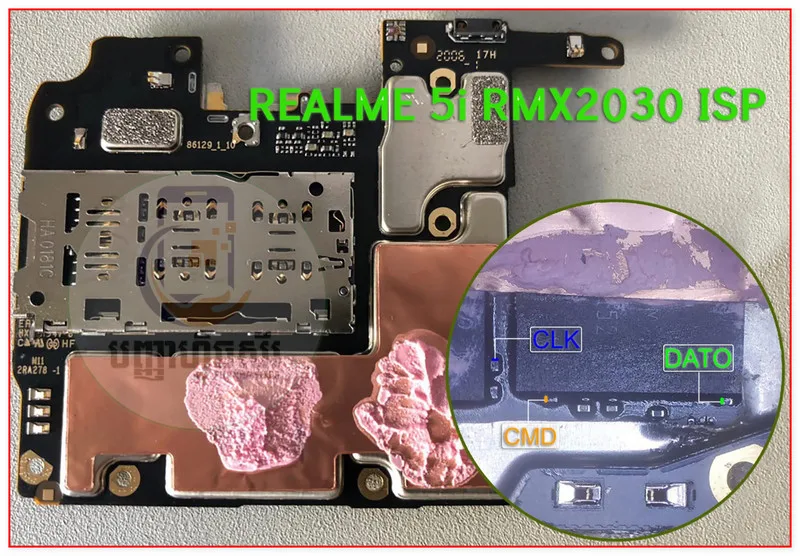
VCC supplies the chip's core power at a maximum of 3.3V, while VCCQ handles the I/O signaling voltage at a strict maximum of 1.8V. GND provides the ground reference and is typically taken from the nearest shield can edge. Since the Realme 5i shipped with more than one board revision, always compare the downloaded diagram with the actual board under your microscope before soldering.
How To Reset And Flash With ISP Pinout
After connecting your ISP wires to the six pads on the Realme 5i's eMMC, power the board through your programmer only. Open your flashing tool and choose the Snapdragon 665 / eMMC profile. Once the chip is detected, you have several options depending on the repair goal.
For FRP removal, use the partition manager to locate and erase the FRP partition — this clears the Google account lock while leaving the rest of the firmware intact. For dead boot recovery, load a known-good stock firmware file for the Realme 5i and perform a full write operation. Monitor the progress bar during flashing and do not disconnect any wires or interrupt power until the tool confirms completion. Once finished, remove all ISP connections, reconnect the battery, and attempt to power on.
How To Find ISP Pinout Realme 5i
Locating the ISP pads on the Realme 5i starts with careful disassembly. Remove the back panel, disconnect the battery immediately, and unscrew the midframe to free the motherboard. Flip the board to its underside and look for the eMMC chip near the center of the board, close to the RF shielding can.
The six ISP pads are clustered around the chip package and are not marked on the silkscreen, so you need magnification to see them clearly. Use the downloaded pinout image side by side with the actual board, matching landmark components to orient yourself correctly. Test each identified pad with a multimeter in continuity mode against known reference points before soldering. Use a pogo-pin jig if available.
Final Words
ISP pinout access on the Realme 5i is a proven repair method for dead boot, FRP lock, and firmware corruption scenarios. The key to a clean session is accurate pad identification, strict voltage discipline, and full ESD protection from start to finish. Always set expectations with the customer that data will not survive the process.

Comments (0)
Be the first to comment.