Description
The Qualcomm SM7550, marketed as the Snapdragon 7 Gen 3, is a modern upper-mid-range 5G platform found in recent smartphones. Devices on this chipset can reach an unrecoverable software state — corrupted firmware, persistent bootloop, or FRP lock with no account credentials. Because newer platforms have strong bootloader protections, ISP pinout access is often the only reliable path. ISP connects a programmer directly to the flash storage via test pads, bypassing the locked boot chain.

Qualcomm SM7550 ISP Pinout Review
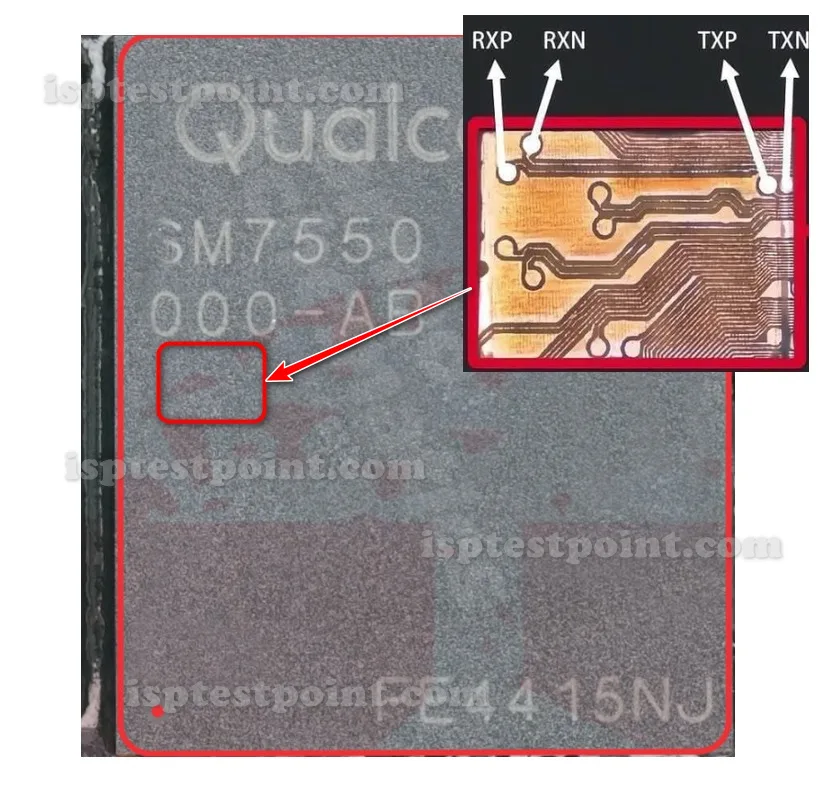
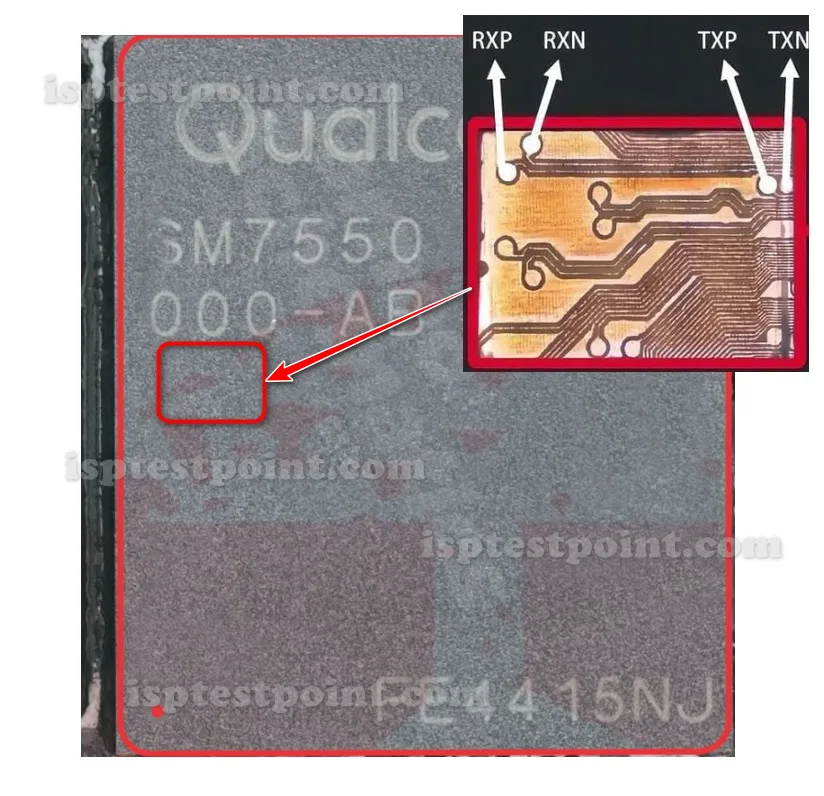
The four ISP points for the SM7550 are TX ON, TX OP, RX ON, RX OP. These serial transmit and receive lines connect your programmer to the storage controller. TX ON and TX OP are the transmit pair; RX ON and RX OP are the receive pair. On this newer platform, the board layout is compact and the pads unmarked, so a verified diagram is critical. Confirm your ISP tool firmware includes the SM7550 profile before starting, as recent chipsets frequently need updates. Verify all four points with a multimeter before connecting.
How To Find ISP Pinout SM7550
Full disassembly is required — back cover off, battery disconnected, motherboard removed and flipped. Locate the flash storage chip near the center, under a shield can. Using magnification, find the four pads for TX ON, TX OP, RX ON, and RX OP. As a recent platform, SM7550 references may be fewer, so a verified diagram is essential. Match against landmark components, confirm continuity on each pad, then solder fine wires or seat a pogo-pin adapter.
How To Reset FRP Unlock With Dril CPU
Connect the four ISP points and power the board through the programmer only. Open your Dril CPU tool and select the Qualcomm SM7550 / Snapdragon 7 Gen 3 profile — update the tool first if the profile is missing. Once the storage controller is detected, navigate to the FRP erase section and delete the FRP partition to remove the Google lock. Confirm and run the operation, then disconnect the wires, reconnect the battery, and boot. The device should pass the FRP screen. If detection fails, check for a TX/RX swap and confirm tool support.
Final Words
The Qualcomm SM7550 ISP pinout offers a reliable FRP reset method for Snapdragon 7 Gen 3 devices, especially where strong bootloader protections block software recovery. Accurate identification of TX ON, TX OP, RX ON, RX OP and an updated Dril CPU tool are the keys to success. Use ESD protection, keep the battery disconnected, and verify each pad before powering on.

Comments (0)
Be the first to comment.