Description
The Qualcomm SM6115, sold as the Snapdragon 662, is a widely used mid-range platform found in many popular budget and mid-tier smartphones. Devices built on this chipset frequently arrive at repair benches with dead-boot issues, bootloops, or FRP locks that software tools cannot clear. ISP pinout access solves these problems by connecting a programmer directly to the flash storage through a set of test pads, bypassing the locked bootloader and unresponsive software.

Qualcomm SM6115 ISP Pinout Review
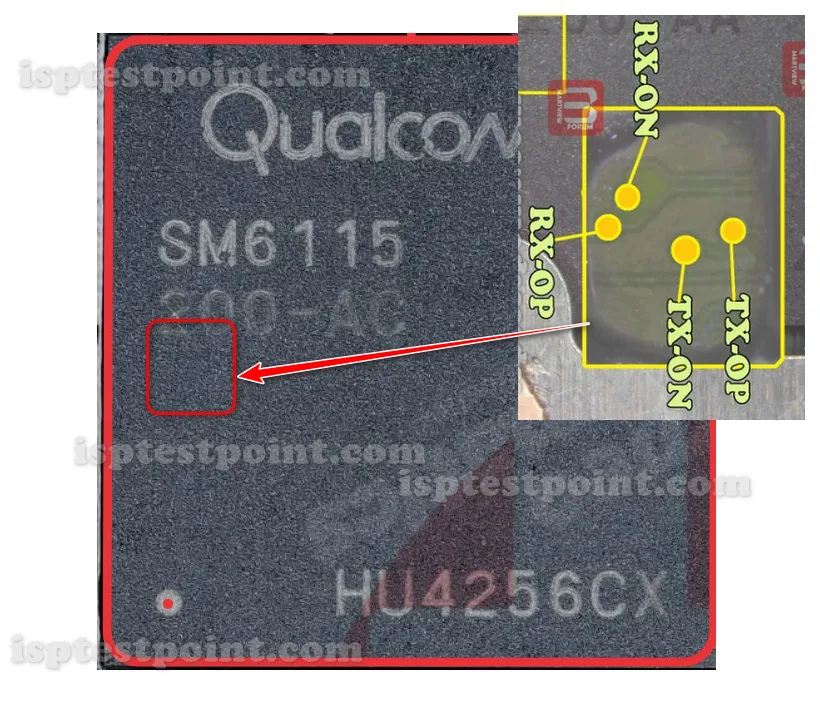
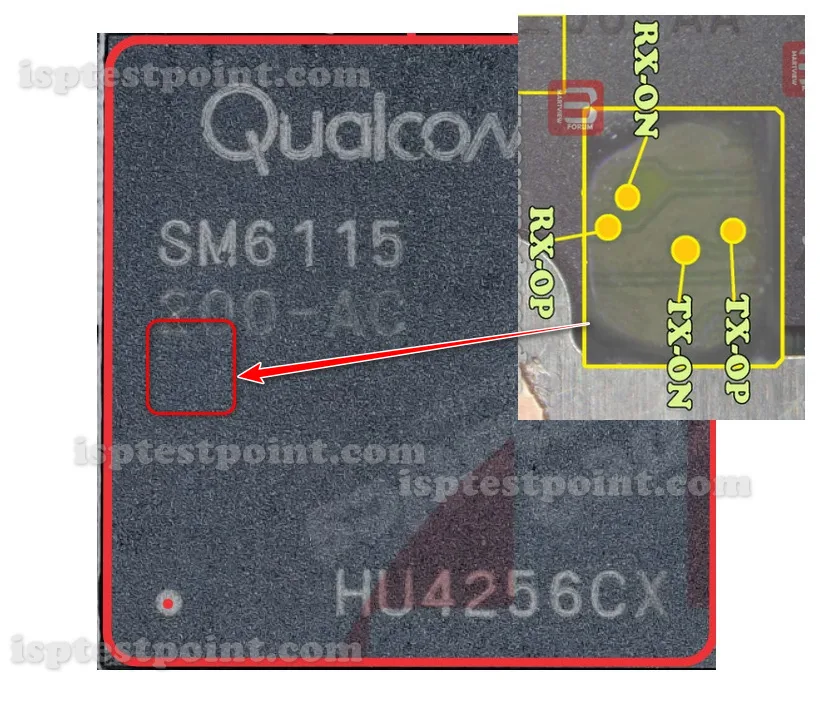
The four ISP points for the SM6115 are TX ON, TX OP, RX ON, RX OP. These carry the serial transmit and receive signals that connect your programmer to the storage controller. TX ON and TX OP are the transmit pair; RX ON and RX OP are the receive pair. On the SM6115 board, these pads sit near the flash chip and are unmarked, so a verified pinout diagram is required. This chipset is common enough that reference diagrams are widely available, but board revisions can shift pad positions slightly, so always compare against your specific unit. Test all four points with a multimeter before connecting.
How To Find ISP Pinout SM6115
Disassemble the device — remove the back cover, disconnect the battery, and take out the motherboard. Flip it to reach the flash storage side, near the center of the board and often under a shielding can. Using magnification, locate the four pads for TX ON, TX OP, RX ON, and RX OP. Because the SM6115 appears in many different phone models, the surrounding board layout varies between devices, so rely on the diagram specific to your phone rather than a generic SM6115 reference. Confirm continuity on each pad, then attach fine wires or a pogo-pin jig.
How To Reset FRP Unlock With Dril CPU
Connect the four ISP points and power the board through the programmer only. Open your Dril CPU tool and select the Qualcomm SM6115 / Snapdragon 662 profile. After the storage controller is detected, navigate to the FRP erase section and delete the FRP partition to clear the Google account lock. Confirm and run the operation, then disconnect the wires, reconnect the battery, and boot. The device should bypass the FRP screen. If detection fails, recheck for a swapped TX/RX pair and confirm the ground connection is solid.
Final Words
The Qualcomm SM6115 ISP pinout is a proven FRP reset and dead-boot recovery method for the widely used Snapdragon 662 platform. Accurate identification of TX ON, TX OP, RX ON, RX OP and a stable programmer connection are essential. Use ESD protection, keep the battery disconnected, and verify each pad before powering on.

Comments (0)
Be the first to comment.