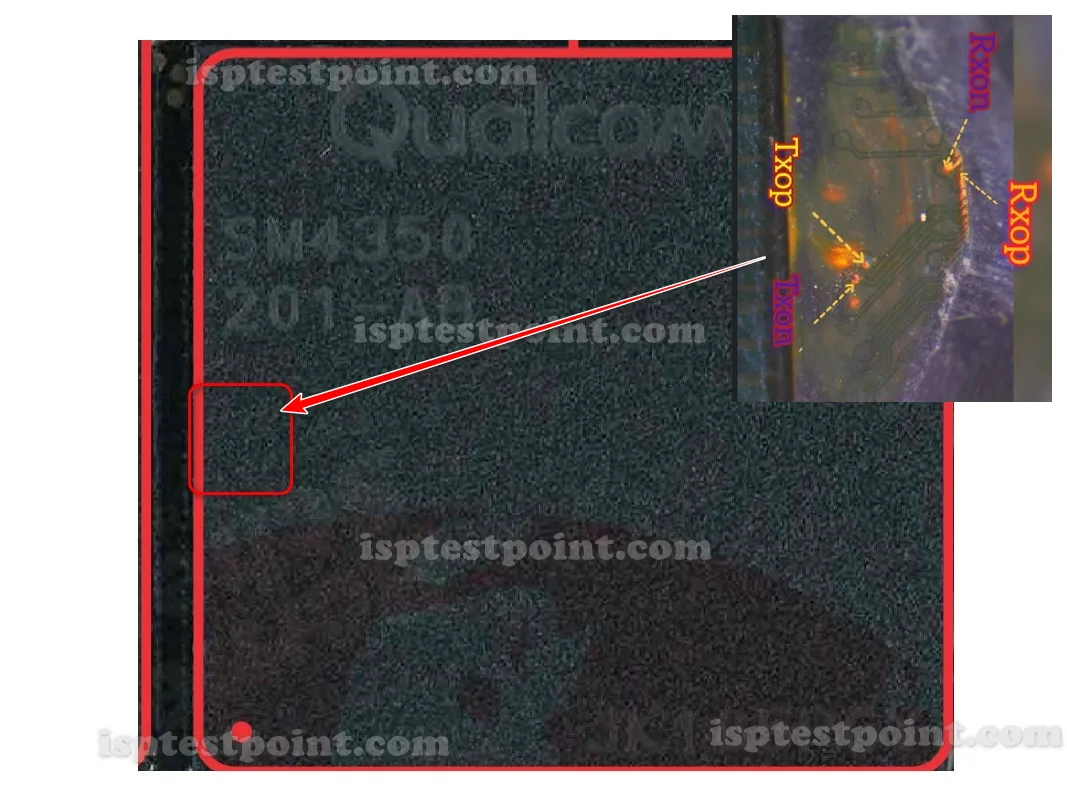
Description
The Qualcomm SM4350 — marketed as the Snapdragon 480 5G — powers a large number of affordable 5G smartphones. Devices on this platform commonly reach a state where normal software recovery cannot help: a corrupted boot partition, a bootloop that survives factory resets, or an FRP lock that blocks setup with no account credentials available. ISP pinout access is the hardware-level answer in these situations. By connecting a programmer directly to a small set of test pads on the motherboard, a technician gains raw access to the flash storage, bypassing the CPU boot chain and any locked software.
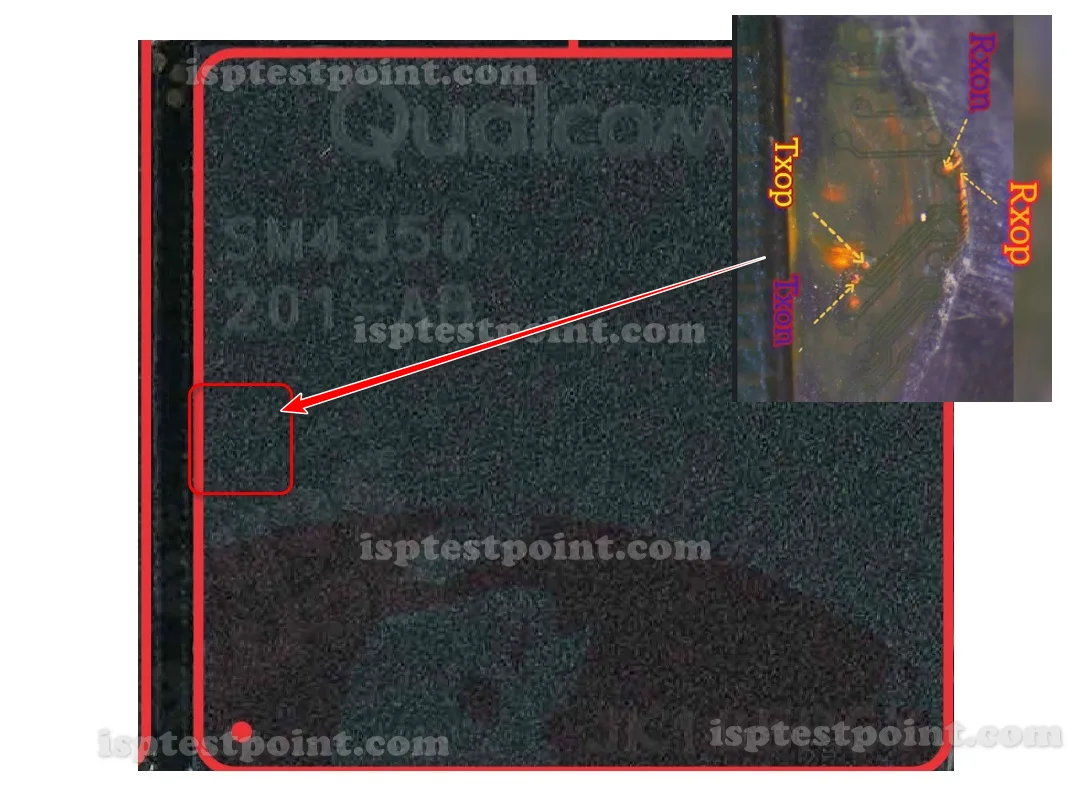

Qualcomm SM4350 ISP Pinout Review
The four working ISP points for the SM4350 are TX ON, TX OP, RX ON, RX OP. These carry the transmit and receive serial signals that link your programmer box to the storage controller. TX ON and TX OP form the transmit pair, while RX ON and RX OP form the receive pair. On the SM4350 board, these pads are located near the flash chip and are not labeled, making a verified diagram essential. Because the SM4350 is a 5G platform, its boards often have denser component layouts than older 4G chipsets, so the ISP pads may sit closer to surrounding parts. Use the finest probe tips available and keep soldering heat brief to avoid damaging nearby components. Verify each of the four points with a multimeter before connecting to the programmer.
How To Find ISP Pinout SM4350
Disassemble the device fully — remove the back cover, disconnect the battery, and take out the motherboard. Flip the board to expose the flash storage side, typically near the center and often under a shield can. Using magnification, locate the four ISP pads matching TX ON, TX OP, RX ON, and RX OP. On denser 5G boards like the SM4350, orientation matters even more, so match the diagram carefully against landmark components before deciding which pad is which. Test continuity on each pad, then attach fine wires or a pogo-pin jig. Take extra care not to bridge adjacent pads, as the tighter layout on this platform makes accidental shorts more likely.
How To Reset FRP Unlock With Dril CPU
With your four ISP points connected, power the board through the programmer only. Open your Dril CPU tool and select the Qualcomm SM4350 / Snapdragon 480 profile. Wait for the tool to detect the storage controller. Navigate to the FRP erase function and select the FRP partition for deletion — this removes the Google lock while leaving the rest of the firmware intact. Confirm and run the operation. After completion, disconnect all ISP wires, reconnect the battery, and boot the device. It should pass the FRP screen. If detection fails, verify that TX and RX pairs are not swapped, and confirm your ground connection is solid, since 5G boards are especially sensitive to a poor ground.
Final Words
The Qualcomm SM4350 ISP pinout is a reliable FRP reset and dead-boot recovery method for Snapdragon 480 5G devices. Accurate identification of TX ON, TX OP, RX ON, and RX OP combined with careful soldering on the denser 5G board layout ensures a clean session. Use ESD protection, keep the battery disconnected, and verify all pads before powering on.

Comments (0)
Be the first to comment.