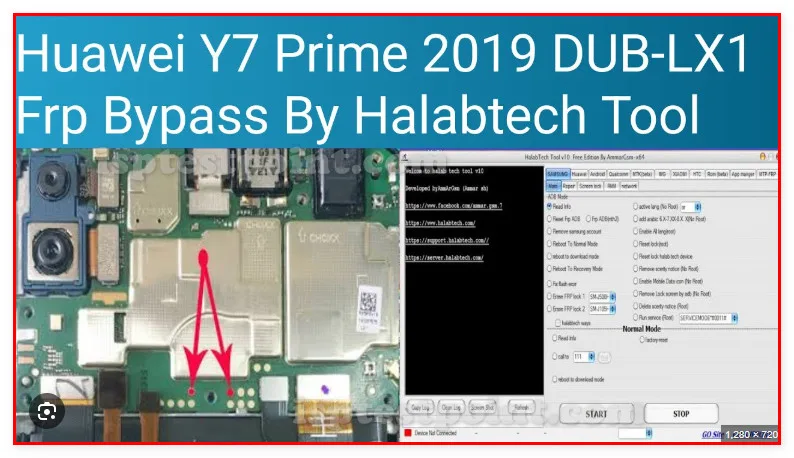
Overview — Understanding Huawei Y7 2019 Test Points and Their Purpose
The Huawei Y7 2019 (DUB-LX1) is a budget-range smartphone that utilizes eMMC flash memory interfaced through a standard NAND controller. Test points provide direct access to critical power rails, ground references, and eMMC signal lines, enabling technicians to perform in-system programming (ISP) without disassembling the device completely. These access points are essential for FRP (Factory Reset Protection) bypass, firmware restoration, and recovery from bricked or dead-boot conditions where normal recovery modes are inaccessible.

When to Use Test Points — Troubleshooting Scenarios Requiring Hardware-Level Access
Test point access becomes necessary when the device exhibits complete boot failure, persistent "Device Corrupt" messages, or when FRP locks prevent normal operation after unsuccessful factory resets. Common scenarios include:
- Firmware corruption requiring full eMMC reprogramming
- FRP unlock for legitimate device owners
- Recovery from dead-boot or "Fastboot" mode loops
- IMEI/serial restoration
- Battery indicator or charging circuit diagnostics
ISP mode activation via test points bypasses software recovery mechanisms, providing direct memory access for repair operations.
Accessing Test Points — Step-by-Step Procedure for Locating and Connecting Probes
Remove the rear cover and battery. Locate the test pads on the main PCB, typically positioned near the eMMC chip or along the lower edge of the board. Use a fine-tipped multimeter probe or specialized ISP clip to make contact with designated pads. Maintain gentle pressure to ensure stable electrical connection without damaging pad metallization. For eMMC ISP operations, connect probes to the corresponding CLK, CMD, DAT0–3, VCC, and GND pins as referenced in your toolchain documentation (UMT, EasyJTAG, or equivalent software). Verify continuity before initiating any read or write cycle. Keep connections brief to prevent thermal stress on pads.
Common Test Point Locations — Voltage Rails, Ground References, and Signal Paths
The DUB-LX1 maintains eMMC test points near the NAND flash memory (typically marked as TP_CLK, TP_CMD, TP_DAT0, TP_GND, TP_VCC). Power rails for 3.3V and 1.8V domains are accessible at dedicated pads, often silkscreened on the PCB. Ground references are distributed across multiple vias and test pads for low-impedance returns. Exact pad coordinates and labeling vary by PCB revision; consult your device's board schematic or donor board for precise identification. Signal integrity depends on probe placement: poor contact results in read errors or programming timeouts.
Safety Precautions — Essential Warnings Before Working with Live Circuitry
Always disconnect the battery before accessing test points to prevent short circuits and component damage. Do not apply test point operations with the device powered on or connected to chargers. Avoid static discharge by wearing an ESD wrist strap grounded to the work surface. Use appropriate tool firmware versions verified for the DUB-LX1 model to prevent eMMC corruption. Limit probe contact duration to prevent thermal damage to surrounding components. Verify voltage levels on power rails (3.3V and 1.8V) before initiating ISP transactions.
Pin / Test Point Reference
| Pin | Description |
|---|---|
| TP_CLK | eMMC clock signal — Required for ISP mode |
| TP_CMD | eMMC command line — Required for ISP mode |
| TP_DAT0 | eMMC data line 0 — Required for ISP mode |
| TP_GND | Ground reference — Multiple ground pads available |
| TP_VCC | 3.3V power rail — Verify before ISP operation |
Tools required: UMT (Universal Multi-Tool), EasyJTAG Plus, Fine-tipped probes or ISP clip, Multimeter with continuity function, ESD wrist strap
Supported operations: Read Firmware, FRP Erase, Dead Boot Repair, IMEI Restoration, eMMC ISP Programming
⚠ Safety note: Disconnect battery before accessing test points. Do not operate with device powered on. Verify 3.3V/1.8V rails before ISP programming. Use ESD protection. Avoid prolonged probe contact to prevent thermal damage.

Comments (0)
Be the first to comment.