Overview
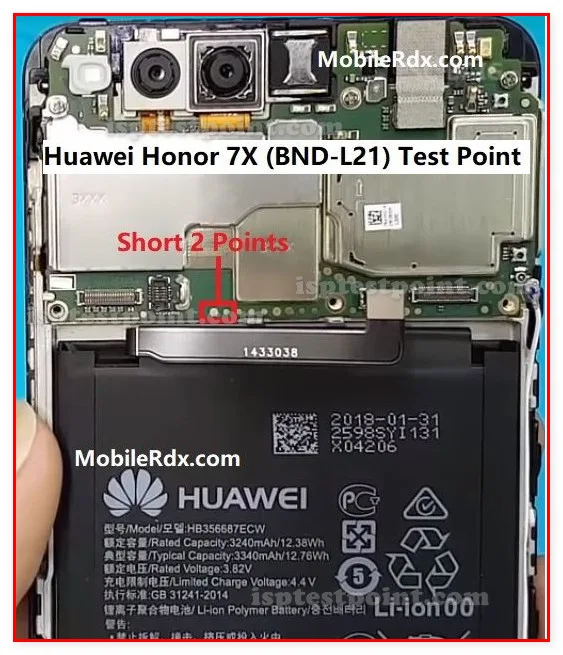
The Huawei Honor 7X (BND-L21) is a mid-range Android device that occasionally requires hardware-level diagnostics and recovery procedures. Test points provide direct access to critical voltage rails and signal lines, enabling technicians to perform firmware reads, FRP (Factory Reset Protection) removal, and emergency boot repairs when software methods are unavailable. This reference guide documents the standardized test point locations and methodologies for the BND-L21 variant.

When to Use Test Points
Test points are essential when the device exhibits symptoms such as: persistent boot loops despite valid firmware, FRP lock preventing user access after factory reset, completely dead or unresponsive units with no USB detection, corrupted bootloader preventing normal recovery mode entry, or failed firmware flashing attempts. Hardware diagnostics via test points allow direct eMMC communication, bypassing software restrictions and verifying power delivery to critical subsystems before attempting recovery procedures.
Access Procedure
Remove the rear cover and battery (if removable) to expose the mainboard. Clean the area around suspected test point locations with isopropyl alcohol and allow to dry completely. Use a fine-tipped probe or specialized ISP connector to contact pads gently—excessive pressure risks pad separation from the PCB. For the BND-L21, test points are typically distributed near the eMMC and CPU regions. Reference the mainboard revision marking (usually silk-screened near the SIM slot) to confirm layout variations. Secure probes using a helping-hands fixture or magnetic probe holder to maintain consistent contact during extended diagnostics.
Common Test Points
Critical test points include:
- Power Rails: VCC (3.3V primary supply), VCCQ (1.8V I/O supply), and GND (ground reference) — essential for verifying proper voltage delivery and identifying short circuits.
- eMMC Interface: CLK, CMD, DAT0–DAT3 (data lines), RST (reset signal), and VCCQ — used for direct eMMC communication via ISP tools.
- Boot Configuration: Test points connected to boot selection logic, typically used to force ISP or download mode activation.
- USB Signal Lines: D+/D− for verifying USB enumeration and controller responsiveness.
Safety Considerations
Always work on a grounded, non-conductive surface and use an ESD wrist strap to prevent static discharge damage. Verify all voltage readings before probing to avoid accidental short circuits. The BND-L21 operates at mixed voltage levels (3.3V and 1.8V); never exceed stated rail voltages. Disconnect power immediately if unusual heat, smoke, or burning odors develop. When using ISP tools, ensure proper connection sequence: ground first, then power and signal lines. Do not probe while the device is powered unless explicitly required by your repair procedure.
Pin / Test Point Reference
| Pin | Description |
|---|---|
| VCC | 3.3V primary power rail — Connect to positive power reference during ISP operations |
| VCCQ | 1.8V I/O supply for eMMC interface — Verify voltage stability before eMMC access |
| GND | Ground reference pad — Establish solid ground contact first in probe sequence |
| CLK | eMMC clock signal — Part of eMMC data bus interface |
| CMD | eMMC command line — Part of eMMC data bus interface |
| DAT0 | eMMC data line 0 — Part of eMMC data bus interface |
| RST | eMMC reset signal — Controls eMMC hardware reset |
| D+/D− | USB differential signal lines — For USB enumeration diagnostics |
Tools required: UMT (Uni-Tool Multi-Functional Tool), EasyJTAG Plus, ISP eMMC reader, Fine-tipped probe set, Multimeter (DCV mode for voltage verification), Helping hands / magnetic probe holder, Isopropyl alcohol and cleaning materials
Supported operations: Read Firmware, Write Firmware, FRP Erase, Dead Boot Repair, Voltage Rail Diagnostics, Boot Configuration Modification, eMMC Direct Access
⚠ Safety note: High risk of pad lift and circuit damage if probes are misapplied. Mixed voltage environment (3.3V and 1.8V rails)—verify voltages before contact. Disconnect power immediately if abnormal heat or smoke occurs. FRP erase may void device activation state; inform customers before proceeding.

Comments (0)
Be the first to comment.